
The Grid and the Model Settings#
The Grid#
Configuring the grid is typically the first step when creating a model setup. The grid defines the geometry of the domain, including the number of grid points, domain lengths in each direction, and how the domain is distributed across processes. Additionally, the grid includes fundamental operators for tasks like computing derivatives and interpolations.
Depending on the model, different grids are available. These grids are generally described in the model documentation. Currently, there are two grid types available: a Cartesian grid, which uses finite differences to compute derivatives, and a spectral grid, which operates in the spectral space. In the future, we plan to add more grid types, such as a rectilinear grid with variable spacing in different dimensions and a spherical grid for simulations on the Earth’s surface.
The following code snippets demonstrate how to create a Cartesian grid:
import fridom.shallowwater as sw

# The number of grid points in x and y directions
Nx = 256; Ny = 256

# The length of the domain in x and y directions (in meters)
Lx = 1_000; Ly = 1_000

grid = sw.grid.cartesian.Grid(
    N=(Nx,Ny), L=(Lx,Ly), periodic_bounds=(True, True)
)

print(grid)
Output
Cartesian Grid
  - N: 256 x 256
  - L: 1.00 km x 1.00 km
  - dx: 3.91 m x 3.91 m
  - Periodic: True x True
import fridom.nonhydro as nh

# The number of grid points in x, y, and z directions
Nx = 256; Ny = 256; Nz = 16

# The length of the domain in x, y, and z directions (in meters)
Lx = 1_000; Ly = 1_000; Lz = 100

grid = nh.grid.cartesian.Grid(
    N=(Nx,Ny,Nz), L=(Lx,Ly,Lz), periodic_bounds=(True, True, False)
)

print(grid)
Output
Cartesian Grid
  - N: 256 x 256 x 16
  - L: 1.00 km x 1.00 km x 100.00 m
  - dx: 3.91 m x 3.91 m x 6.25 m
  - Periodic: True x True x False
In both cases, the grid is created with periodic boundary conditions in the x and y directions. In the 3D model, the z direction does not have periodic boundaries.
After initializing the grid, it must be set up using the .setup() method before it can be fully functional. To do this, a ModelSettings object is required, which we will introduce in the next section. Once you are familiar with the ModelSettings object, we will also cover some of the grid’s functions at the end of this tutorial.
Before moving to the ModelSettings object, it is important to explain why we separate the initialization and setup of the grid. This distinction is crucial for parallelizing models. When running a model across multiple processes, the domain is divided into subdomains, with each subdomain assigned to a process. Each process only stores information about the grid points within its subdomain.
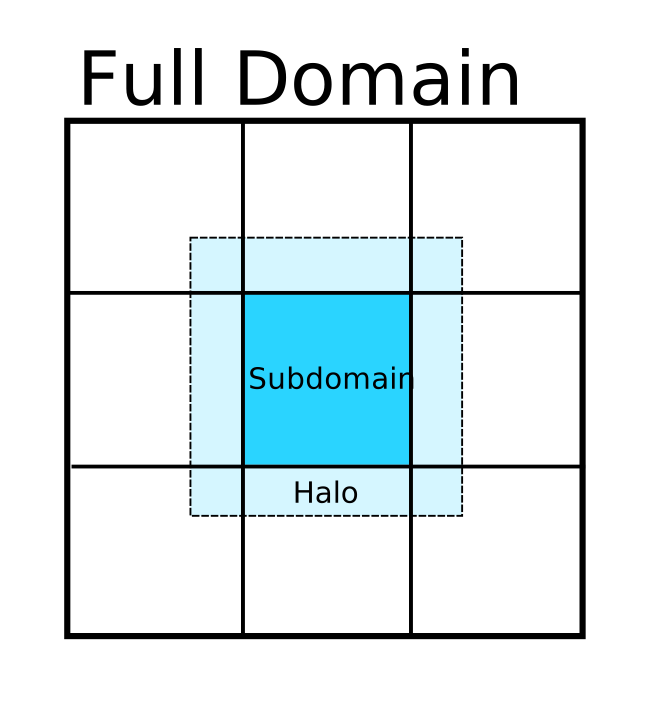
Schematic of a domain divided into 9 subdomains. For the subdomain in the middle, a halo region is shown. Each subdomain has a halo region like the one in the middle.#
At the edges of each subdomain, issues arise when calculating finite differences due to missing information from adjacent processes. To address this, a “halo” region (also known as “ghost cells”) is created around each subdomain to store information from neighboring subdomains. But how large should these halo regions be? The answer depends on the modules used by the model. Thus, the ModelSettings object, containing all module information, must be created before the grid can be fully set up.
The ModelSettings Object#
The ModelSettings object holds all information about the model parameters and modules. The concept of modules is explained in more detail in this tutorial, but for now, you only need to know that a module represents a specific component of the model, such as the computation of the tendency due to the Coriolis force, or advection. But also diagnostic components, like those for model output or energy computation, are modules.
The model parameters vary depending on the model. For example, in the 2D shallow water model, parameters include the Coriolis frequency \(f_0\) and the wave speed, \(c^2 = gH\), where \(g\) is gravitational acceleration and \(H\) is the mean water depth. For a full description of model parameters, refer to the model documentation.
The following code snippets demonstrate how to create and setup a ModelSettings object for the 2D shallow water model:
import fridom.shallowwater as sw

grid = sw.grid.cartesian.Grid(N=(256,256), L=(1,1), periodic_bounds=(True, True))

# Settings parameters for the 2D Shallow Water Model
f0   = 1e-4   # Coriolis frequency in 1/s
g    = 9.81   # Gravitational acceleration in m/s^2
H    = 20     # Mean water depth in m
csqr = g*H    # Square of the wave speed

# Create the ModelSettings object
mset = sw.ModelSettings(grid=grid, f0=f0, csqr=csqr)

# Optional:
#   Modifying and adding modules

# Setup the ModelSettings object
mset.setup()

print(mset)
Output
=================================================
  Model Settings:
-------------------------------------------------
# ShallowWater
# Parameters:
  - coriolis parameter f0: 0.0001 s⁻¹
  - beta term: 0 m⁻¹ s⁻¹)
  - Phase velocity c²: 196.20000000000002 m²s⁻²
  - Rossby number Ro: 1
# Grid: Cartesian Grid
  - N: 256 x 256
  - L: 1.00 m x 1.00 m
  - dx: 3.91 mm x 3.91 mm
  - Periodic: True x True
# Time Stepper: Adam Bashforth
  - dt: 1 s
  - order: 3
# Restart Module (disabled)
  - Directory: restart
  - Filename: model
# Tendencies: Module Container
## Reset Tendency
## Linear Tendency
## Sadourny Advection
  - Required Halo: 2
# Diagnostics: All Diagnostics
=================================================
Note
The creation of ModelSettings objects in other models follows a similar pattern. For now, we will focus on the 2D shallow water model.
The first argument of the ModelSettings constructor is always the grid object. The subsequent arguments are the model parameters. The creation of modules will be covered in later tutorials. After adding all modules, the .setup() method of the ModelSettings object must be called. This method triggers the .setup() methods of the grid and all modules, ensuring that the model is fully prepared to run.
Working with the Grid#
Once both the grid and ModelSettings object are created, you can use the various functions provided by the grid. One of the most commonly used attributes is the meshgrid, which stores the spatial coordinates of the grid points. For a 2D Cartesian grid, it contains the x and y coordinates. The following code snippets demonstrate how to access the meshgrid:
import fridom.shallowwater as sw

grid = sw.grid.cartesian.Grid(N=(256,256), L=(1,1), periodic_bounds=(True, True))
mset = sw.ModelSettings(grid=grid, f0=1e-4, csqr=9.81*20)
mset.setup()

X, Y = grid.get_mesh()
import fridom.nonhydro as nh

grid = nh.grid.cartesian.Grid(N=(256,256,16), L=(1,1,1), periodic_bounds=(True, True, False))
mset = nh.ModelSettings(grid=grid)
mset.setup()

X, Y, Z = grid.get_mesh()
If the grid allows for Fourier transformations, you can also access the k-space mesh with the spectral=True argument:
import fridom.shallowwater as sw

grid = sw.grid.cartesian.Grid(N=(256,256), L=(1,1), periodic_bounds=(True, True))
mset = sw.ModelSettings(grid=grid, f0=1e-4, csqr=9.81*20)
mset.setup()

Kx, Ky = grid.get_mesh(spectral=True)
import fridom.nonhydro as nh

grid = nh.grid.cartesian.Grid(N=(256,256,16), L=(1,1,1), periodic_bounds=(True, True, False))
mset = nh.ModelSettings(grid=grid)
mset.setup()

Kx, Ky, Kz = grid.get_mesh(spectral=True)
The meshgrid is represented as an array, which could be a numpy, cupy, or jax.numpy array, depending on the backend used. For more information about backends and how to change them, see here. We use the jax backend.
To simplify working with different backends, you can access ncp from the config module. Depending on the backend, ncp will be either numpy, cupy, or jax.numpy. For example, arrays can be created as follows:
import fridom.shallowwater as sw

grid = sw.grid.cartesian.Grid(N=(256,256), L=(1,1), periodic_bounds=(True, True))
mset = sw.ModelSettings(grid=grid, f0=1e-4, csqr=9.81*20)
mset.setup()

# Load the "numpy"-like module from the config
ncp = sw.config.ncp

# Access the meshgrid
X, Y = grid.get_mesh()

# Create an array with zeros of the same shape as the meshgrid
u = ncp.zeros_like(X)
Arrays should always be based on the meshgrid to ensure that their dimensions are correct. This is particularly important for ensuring consistency with parallelized cases.
The grid also provides several other functions, which are not covered in detail here. Most of these functions are not directly used but are utilized by the ScalarField class, introduced in the next tutorial. The ScalarField class is essentially a wrapper around ncp arrays, offering various functions to facilitate working with them.